
Keep an eye on deadlines and deadlines
Whether you work as a lawyer, consultant or in administration, meeting important deadlines and deadlines is a top priority. Vertec’s deadline monitoring feature shows your personal deadlines, but it can also show the deadlines of your team or the entire company. A traffic light system has proven itself, which you can also customize individually.
Yellow = deadline expires in 5 days
Orange = deadline expires in 3 days
Red = deadline expires
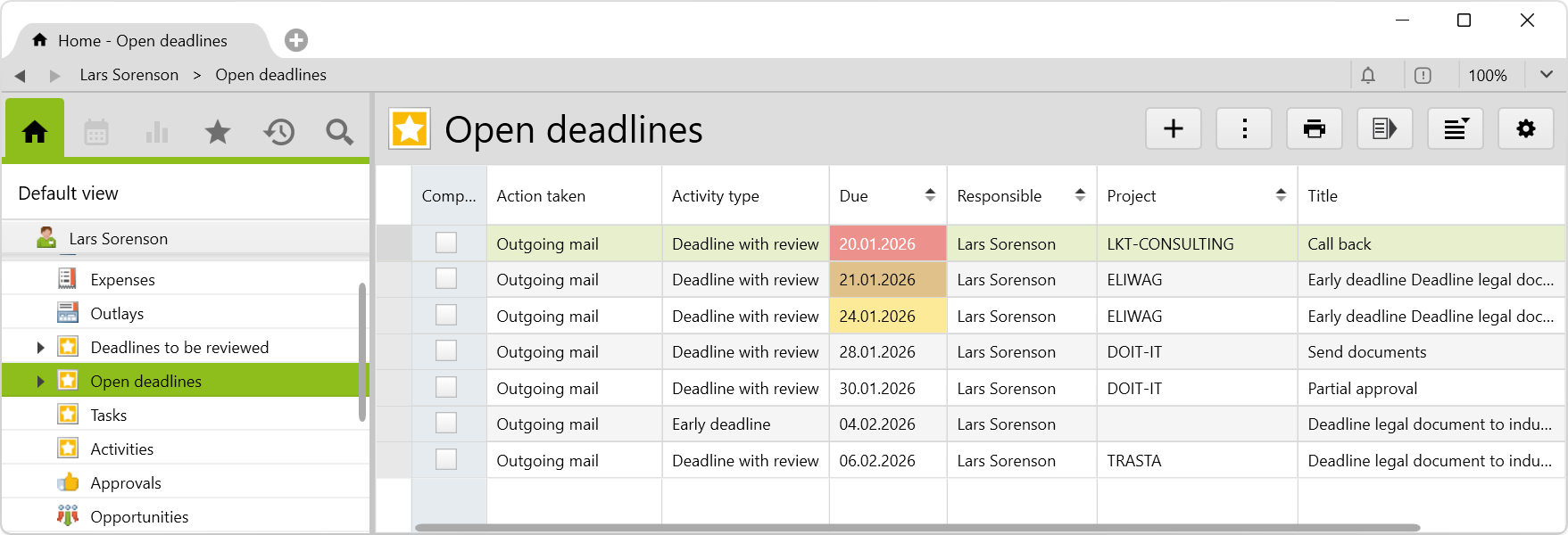
Show all overdue tasks and deadlines of your firm or team in the case or project history. So you always have an overview of: appointments, tasks with due date (tasks), follow-up and unfinished tasks of all employees.
If you create a new task in Vertec as an activity, you have to enter a resubmission date. This new activity will then appear in the open activities area. You can also create notes and link a contact to a task.
The issue of Deadline monitoring in law firm management plays a central Role, especially for lawyers. The deadline control deadline monitoring in Vertec not only enables the easy creation of creating deadlines and pre-deadlines, but also offers the possibility of monitoring them centrally.
In addition, activities can be expanded so that deadlines are available as a default object in all other apps, allowing for seamless integration of deadlines into different workflows and applications within your firm.
You can create tasks for yourself or other employees directly in Vertec and link them to internal projects, for example. A deadline can be created for each task or the task can be created as recurring.
In day-to-day business, the efficient management of follow-ups and appointments is essential. Outlook tasks, calendar entries or project management tools are only recommended to a minimum. Task and follow-ups are not visible to all users. The complete history of a project or case is also not visible.
With Vertec, you can work much more globally. You can quickly and easily capture, enter and track your activities, follow-ups and appointments. You can also see at a glance whether an assigned task has already been completed.
When you log in to Vertec, you can be alerted to appointments or deadlines via a pop-up. In addition to your own appointments, team leaders can also search and view the open tasks of their own team. For certain events, an automatic email can be sent to the responsible users. This way, everyone keeps an overview.
You may test Vertec for 30 days free of charge and without obligation in your personal test environment.
Start your free trial now.


